Showing posts with label silhouette cameo. Show all posts

Silhouette Cameo Two Color Design


I finally made my first two-color design with my Cameo!  It's pretty simple and you might learn a trick or two if you keep reading.

Glass Etching with Silhouette Cameo


I love to etch glass, it is one of those completely rewarding projects with a big reveal at the end. It's pretty simple, you make a vinyl stencil for your surface and apply etching cream to the area. There's a couple things to remember, so keep reading...


CHEATER'S TIP! How to do a print-and-cut WITHOUT a registration markson your Silhouette Cameo


I am making some cards for my daughters class. Cards to give their friend who just had surgery to remove a brain tumor. He's 10. It's Christmas time, his birthday is Dec. 31st, and he's about to start 5 or 6 rounds of very aggressive chemo and radiation. It's heart-wrenchingly sad.

Click to support Team Ben via Go Fund Me  ~ thank you!

So I'm using my Cameo for something that might bring a smile to his face!  My friend Denise wanted to make cards for the class to give Ben and I offered to help. 


Zebra Letters For A Tween Bedroom Makeover


In this post I will show how I revamped my daughter's name letters from baby nursery pink to sassy black and purple zebra stripes.


Etching With Silhouette Cameo + A Troubleshooting Tip


I finally got to have some fun with my Silhouette tonight!  I tried something new and made vinyl stencils to etch glass.  My mom gave me these ramekins that came with a frozen creme brulée from Costco (yes, it was delish).  I wanted to put a cute message on the bottoms, sort of a little surprise when you finish your treat. 

An Unfinished Soldering Project

I couldn't wait to start soldering this weekend... I had a whole bunch of picture frame glass leftover from my earring board project, so I'd been racking my brain for ideas to use the glass. I took a stained glass class in college, and decided to pick up a super cheap soldering iron on sale for $5 at JoAnn. I picked up some copper tape and a spool of solder at Hobby Lobby, and ordered some flux on Etsy and I was set.  It sounds like a lot but once you get the bug to make something, there's no going back. 

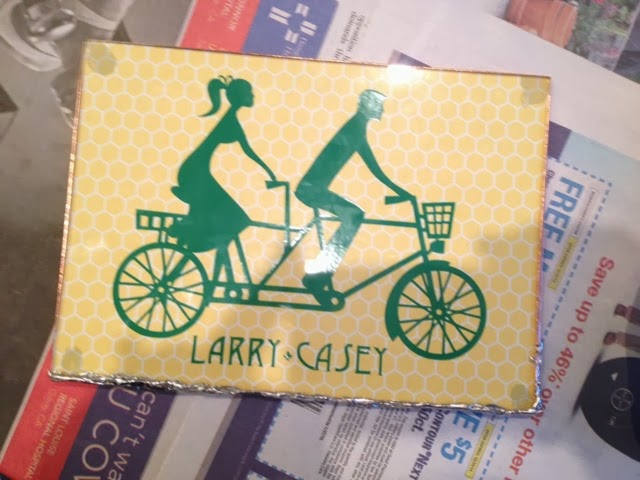
I needed to make a late Christmas gift for my dad and his girlfriend -- they are active, beach bum types.  I used my Silhouette Cameo to cut this cute vinyl sticker of a couple on a tandem bike (#27595 in the Silhouette store online), and added the lettering. 

43 Project Ideas for Silhouette Cameo (Pin This!)


I debated calling this "43 reasons to get a Silhouette"...  If you're thinking about getting yourself a Silhouette (you should! and use my affiliate link please!) or you have one and you're not sure where to begin (it can be overwhelming), here are a variety of super creative ideas to get started.  Most have links to tutorials, but some are just eye candy.  I spent WEEKS putting this together so, for heaven's sake, the least you could do is pin it for later ;)  


How I Finally "Got" Compound Paths: Fleur de Lis Oval Frame with (you guessed it) Silhouette Cameo


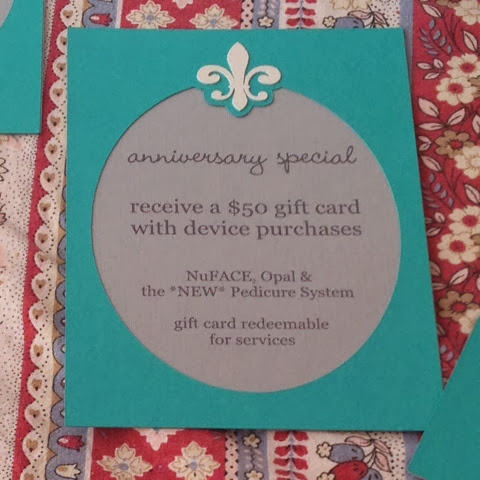
I made these fleur-de-lis signs for my mom's skincare business' 9th anniversary party, to match the invitations we made. I won't get too picture crazy but I want to give you the lowdown on how it went together.  I had a little breakthrough and came one step closer to understanding compound paths, which sure makes designing easier, so I hope this helps you "get it" too.

Basic (But Not Too Basic) Design Functions With Silhouette Studio


If you're ready to move beyond downloading a shape, resizing it and cutting then you will appreciate this post.  I just took some screen shots showing some of the things you can do with the Silhouette Design Studio - Group, Ungroup, Weld, Subtract, Offset, Knife/Slice, Compound Paths, Align and Curved Text.  Just basic stuff, but some neat tricks that might take a while to figure out on your own (I learned a lot of this by pouring through countless tutorials online, hopefully this saves you the trouble).

Yes, You CAN Use Cricut Mats With Silhouette Cameo!


One of the challenges with the Cameo is that not all craft stores sell Silhouette products, and sometimes you need a blade or mat or whatever NOW.  Not in however many business days plus shipping and handling... RIGHT NOW!  This is where I found myself while making 200+ invitations and needing a new mat.  I do believe my local Michaels sells Silhouette products, but I was at Hobby Lobby getting cardstock (I had already bought up everything in the color I needed at JoAnn and Michaels!) and Hobby Lobby only had Cricut supplies, so you see my dilemma.  I bought a 2-pack of 12x12 Cricut mats on sale for $9.99.  They also had one light grip or one super grip for $10-14, so the 2-pack was the obvious choice for me.

When I got home, I lined up the Cricut mat with my Silhouette mat to see the difference.

Fleur-de-Lis Print-and-Cut Invitations with Silhouette Cameo


This post contains affiliate links :)

I got real close with my Cameo this week. We're best buds now. We've had a love/hate relationship thus far, and you know what took us to the next level?  Patience. Patience and a new mat. I made hundreds (literally) of these fleur de lis invitations and learned so much about the Silhouette in the process. The majority of my issues were resolved when I got a new mat. I spent the better part of 2 days working on this project with my original cutting mat which had lost most of its stickiness. I was cutting through the mat, the paper was moving around and tearing, it was a nightmare. Finally I realized that I needed a new mat so I got a 2-pack of Cricut mats (yes, that's right) and suddenly the clouds lifted and there were blue skies and angels singing. For realsies.  Also at some point I realized that I hadn't been locking the blade in correctly - how is this possible?!  I have always thought the blade locking wasn't designed well.  So here is the lowdown...

Finally! Paper Cutting Success With Silhouette Cameo & How To Use Weld And Offset


Cutting paper has been one of the most frustrating tasks with my Silhouette Cameo!  (affiliate link) I suppose that's because there are so many kinds of paper so you have to keep tweaking the settings.  Today my patience was rewarded with my first major success.  I had to write it up quick before I forgot everything and I figured I would turn it into a little demo using some of the basic tools in the Silhouette Design Studio while I was at it.

Printable Heat Transfer With The Silhouette Cameo Using Registration Marks

This post contains affiliate links :)

Did you ever get a care package in college?  I remember the time my mom sent me the best. cookies. ever.  I'm putting together a care package for my cousin who is a freshman at UNLV. She's still living at home, and I thought she especially needs a care package so she doesn't feel like she's missing out on the dorm experience. She's very health conscious so I packed her favorite dried mango and toasted seaweed from Trader Joes, some makeup, and I made her this shirt.  Not the most academic of care packages.  The design is inspired by the tattoo she wants, an American Traditional heart and banner that reads "Rudig girl" - Rudig being our mothers' maiden name, and the Rudig sisters (our aunts) being three strong, capable chicks.

If you don't know much about heat transfers, you can do it a couple different ways.  You can buy heat transfer vinyl in different colors, and even layer them if you want... or you can use printable heat transfer paper that allows you to print the design with an ordinary inkjet printer.  The printable option is nice for designs with more than one color if you don't want to deal with separating your design by color and cutting/applying multiple layers.  Printable heat transfer is also a good option for designs with shading, like the heart and bird in my design.

Easy Silhouette Cameo Project - Personalized Doggie Vinyl Window Sticker


I admit I totally copied this idea from places like this on Etsy, but it was a really fun, easy project to break in my Cameo.  Sorry I didn't capture the whole process with photos - if you know a little about the Cameo it is easy to figure out.  This is the perfect beginner project -- if you don't have your Silhouette yet, I'd appreciate you using my affiliate link!

Custom Water Bottle Labels With Silhouette Cameo


My mom's party at La Nebbia Winery may as well have been sponsored by Silhouette because I used it for so many projects!  I was trying to create a French ambiance and one of the small ways I did that was to have un caraf d'eau on all the tables. Friends generously donated 1-liter glass water bottles and I made custom labels to brighten up the table and personalize it a bit.